Alert Methods: Manual vs Pine Script
This guide compares the two main methods for creating TradingView alerts and helps you choose the right approach for your needs.
TradingView allows you to automate alerts in two main ways:
- Manual Alerts(Without Pinescript) – Created using TradingView's UI (no coding)
- Pine Script Alerts – Triggered by strategy or indicator scripts
Both types can integrate with Xerolite via webhook, but they differ in flexibility, complexity, and how alert messages are constructed.
🧩 Key Differences
| Feature | Manual Alert | Pine Script Alert |
|---|---|---|
| Created via | TradingView UI | Script (e.g., strategy.entry) |
| Needs coding? | ❌ No | ✅ Yes |
| Webhook support | ✅ | ✅ |
| Placeholders | ✅ Some (e.g. {{close}}) | ✅ Full support (e.g. {{strategy.order.price}}) |
| Custom logic | ❌ Limited | ✅ Fully programmable |
| Alert reuse | ❌ Must create multiple alerts | ✅ One strategy, multiple alerts |
| Best for | Simple price-based alerts | Advanced automation |
💬 Alert Message Format Comparison
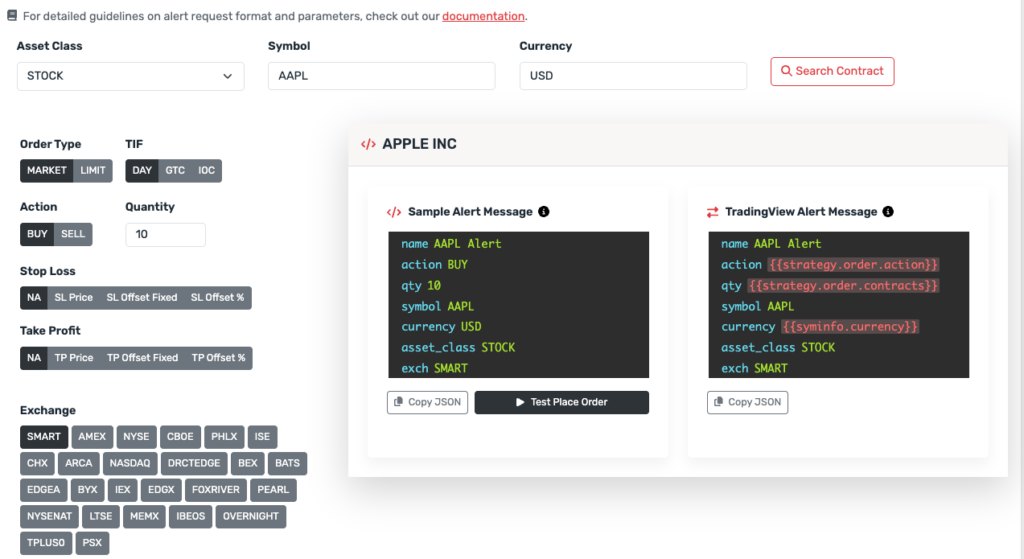
When integrating with Xerolite, alerts must send a valid JSON message to the webhook URL. Below is how the JSON is written in each method:
📦 Manual Alert Example (Hardcoded)
{
  "action": "BUY",
  "symbol": "AAPL",
  "qty": "10",
  "order_type": "MARKET",
  "currency": "USD",
  "asset_class": "STOCK",
  "exch": "SMART"
}
Manual alerts require you to hardcode every field. If you want to change quantity, symbol, or order type, you need to edit each alert individually.
⚙️ Pine Script Alert Example (Using Placeholders)
{
  "action": "{{strategy.order.action}}",
  "symbol": "AAPL",
  "qty": "{{strategy.order.contracts}}",
  "order_type": "MKT",
  "currency": "{{syminfo.currency}}",
  "asset_class": "STOCK",
  "exch": "SMART"
}
This format allows dynamic values to be filled in at runtime by TradingView, based on your Pine Script strategy. You write the alert once and reuse it across multiple conditions.
💡 Tip: Avoid using {{ticker}} because it may not match Interactive Brokers' symbol format. Instead, use fixed symbols and define symbol, asset_class, and exch manually, or generate alerts using the Xerolite Smart Alert Builder.
✅ Pros & Cons Summary
🖱️ Manual Alerts
- ✅ Simple setup, no coding needed
- ✅ Good for price alerts or static trades
- ❌ Limited to fixed logic
- ❌ No access to real-time trade values
- ❌ Must create one alert per action (e.g. buy/sell)
💻 Pine Script Alerts
- ✅ Full control via script logic
- ✅ Use placeholders for dynamic values
- ✅ Fewer alerts needed (one script = multiple trades)
- ❌ Requires coding knowledge
- ❌ May take time to debug properly
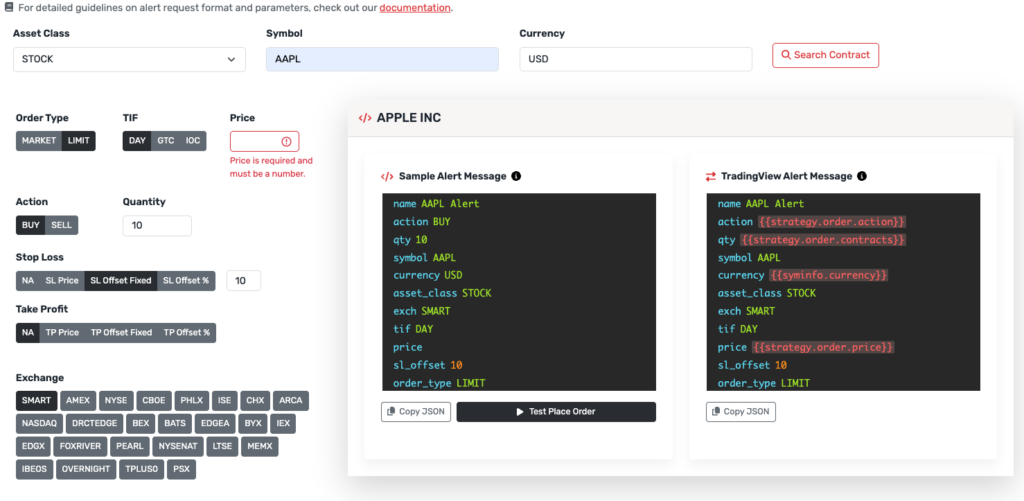
🛠️ Generate Alerts with Smart Alert Builder
To avoid JSON formatting mistakes and ensure broker compatibility, use the Xerolite Smart Alert Builder in Xerolite. It supports both static and placeholder-based messages.
👉 View Alert Request Builder User Manual
👉 View supported fields & placeholders
🔗 Related Guides
- Create TradingView Alert – Main guide with step-by-step instructions
- Manual Alerts Guide – Detailed manual alerts reference
- Pine Script Alerts Guide – Detailed Pine Script reference
- How XeroLite Processes TradingView Alerts – Technical processing details